



Transparency in commitments
Commitment to service
Service tariff
📅 Update on: 1405/03/30
Service tariff
تعرفه سرویس
| Category | Cost of replacing parts | هزینه کارشناسی و تعویض قطعات | Overhaul | By phone | Bachelor of Purchasing |
|---|---|---|---|---|---|
| Laser cutting machine | 5.000.000 | 7.000.000 | 15.000.000 | 1.000.000 | 10.000.000 |
Banner printing machine | 8.000.000 | 10.000.000 | 25.000.000 | 2.000.000 | 15.000.000 |
| Eco-solvent printing machine | 8.000.000 | 12.000.000 | 25.000.000 | 2.000.000 | 15.000.000 |
| Digital printing machine | استعلام بگیرید | ||||
| دستگاه پلاتر و کاتر پلاتر | استعلام بگیرید | ||||
| تبدیل دستگاه | استعلام بگیرید | ||||
Round-trip fare
| Category | Warranty | Non-warranty |
|---|---|---|
| شهر تهران | 1.000.000 | مشابه گارانتی |
| حاشیه شهر تهران | 1.200.000 | مشابه گارانتی |
| شهر کرج | 1.500.000 | مشابه گارانتی |
| شهر شیراز | 500.000 | مشابه گارانتی |
| حاشیه شهر شیراز | 800.000 | مشابه گارانتی |
| بین شهری کمتر از 100 ک.م. | هر کیلومتر 15.000 | 1.500.000 |
| بین شهری 100 تا 300 ک.م | هر کیلومتر 15.000 | مشابه گارانتی |
| بین شهری بالای 300 ک.م | هر کیلومتر 15.000 | مشابه گارانتی |
Accommodation tariff
| Category | Warranty | Non-warranty |
|---|---|---|
| کمتر از 500 کیلومتر | بر عهده مشتری فقط درصورت عدم اتمام سرویس تا ساعت 17 فارغ از زمان شروع به کار | مشابه گارانتی |
| بیشتر از 500 کیلومتر | بر عهده مشتری حداقل برای یک شب فارغ از زمان شروع به کار و برای شب های دیگر بسته به حضور تکنسین | مشابه گارانتی بعلاوه روزانه 1.000.000 |
Head washing tariff
| Category | مواد وارداتی | مواد ایرانی |
|---|---|---|
| هد زار 128 | 2.500.000 | 1.000.000 |
| Konica 512 head | 4.000.000 | 2.000.000 |
| هد کونیکا 512 آی و 1024 | 5.000.000 | 2.500.000 |
| Epson head | 5.000.000 |
Terms and Conditions
Services available
- Printing machinery repair service (Banner, eco-solvent, flatbed, digital copy, plotter, laminator, etc.)
- Laser machine repair service (Non-metals, metals, marking, etc.)
- Woodworking machinery repair service (CNC, vacuum press, edge banding, punching, etc.)
- Machinery installation and training services
- Head washing service
Banner printing machine با دستگاه اتومات مخصوص - Expert services for purchasing equipment
Technician visits the seller, conducts an expert review, and provides expert opinions about the device to the buyer. - Expert services for on-site workshop visits
Technician visits the customer's workshop, conducts an expert review, and provides expert opinions to the customer.
Warranty Terms
Machinery
- What does the warranty include?
- The fee is free (except when the device needs to be relocated for any reason).
- Repair and replacement of parts are free of charge (except for consumable parts and the items mentioned in the next paragraph).
- Telephone consultation is free.
- What is not covered by the warranty?
Some consumable parts specified in the after-sales service contract.
Note: These same parts may also be warranted in sales agreements for a higher amount. - What voids the warranty?
- Third-party supervision in servicing and installing the device
- Not using earth wells and stabilizers
- Non-standard workshop conditions
- How do I request a service?
Contacting Mobin Tek's service department is the only way to contact Mobin Tek. (Contact Us Page)
- What does the warranty include?
Spare parts
- Does the sale of parts include a warranty?
Spare parts are not covered by the warranty unless, by prior agreement, the part is installed by Mobin Tek. In this case, the part is only warranted until the moment of installation and Mobin Tek will not be responsible for the part after the technician leaves.
- Does the sale of parts include a warranty?
Raw materials
- Are raw materials included in the warranty?
If the raw material packaging is not used and not opened, it includes a return or replacement guarantee.
- Are raw materials included in the warranty?
Installation requirements
Laser cutting machine
- 2.5 in 3 cable (The length depends on the distance from the high-quality and strong outlet to the stabilizer connection point of the device, plus 2 meters more)
- 3 in 1.5 cable (For suction cup installation)
- Alcohol – 150 cc (for cleaning lenses and mirrors)
- Paper towel – 1 pack (for cleaning lenses and mirrors)
- Distilled water or oil radiator water – 8 liters (for startup) Chiller)
- 5 cm paper glue – 1 piece (for Mirror adjustment)
- Hose level 8 – 4 meters (if chiller is installed next to the device)
- Wood or plexiglass 3mm exterior – 1 square meter (for device calibration and testing)
- Suction hose (15cm diameter as needed from the device to the air outlet)
- Industrial plug – 2 pieces (for stabilizer and suction cup)
- Industrial tee – 1 piece (for connecting peripheral equipment)
- Earth well (⚠️ Important: Wiring to the right side of the device)
- Stabilizer – 1 unit (3kva) 🔖 Possibility to buy a check from Mobin Tek
- Mercury thermometer – 1 piece (for measuring ambient temperature)
- Engraving and cutting design (If you have a special project or task)
- Standard ambient temperature of the device (Temperature 18 to 26 degrees Celsius)
- Computer or laptop (CPU: CORE i3 / Ram: 4GB / windows: 7-8-10)
- Higher hardware specifications are acceptable.
- Windows must be freshly installed and raw, without any software or antivirus.
Banner printing machine
- 2.5 in 2 cable (The length depends on the distance from the high-quality and strong outlet to the stabilizer connection point of the device, plus 2 meters more)
- USB cable (1.5 meter noise-canceling printer)
- Power cable (Industrial)
- 3-way industrial socket (For stabilizer)
- Industrial plug (For stabilizer)
- Night cover handkerchief – 1 roll (for cleaning the head)
- Hydraulic oil – 1 liter (for lubricating the rails)
- Copper welding wire and zip ties – 4 pieces or 2 meters (to secure the hose in the gallon)
- Spoon – 8 pieces
- Solvent – 5 liters (dry and oily mixture according to the purchased head) 🔖 Possibility to buy a check from Mobin Tek
- 30 picoliter ink – 5 liters of each color (make sure according to the type of machine) 🔖 Possibility to buy a check from Mobin Tek
- Chinese banner roll – 1 roll (10 oz. width 320) 🔖 Possibility to buy a check from Mobin Tek
- Earth well (⚠️ Important: Wiring to the right side of the device)
- Stabilizer – 1 unit (3kva) 🔖 Possibility to buy a check from Mobin Tek
- Mercury thermometer – 1 piece (for measuring ambient temperature)
- Standard ambient temperature of the device (Temperature 20 to 24 degrees Celsius)
- Computer or laptop (CPU: CORE i3 / Ram: 4GB / vga: 1G / windows: 7-32bit)
- Higher hardware specifications are acceptable.
- Windows must be 32-bit.
- Windows must be freshly installed and raw, without any software or antivirus.
- ⚠️ Important: The maximum time to request installation of the device is three days after the device is shipped. Otherwise, the customer is responsible for the health of the heads.
Eco-solvent printing machine
- 2.5 in 2 cable (The length depends on the distance from the high-quality and strong outlet to the stabilizer connection point of the device, plus 2 meters more)
- USB cable (1.5 meter noise-canceling printer)
- Power cable – 2 pcs (industrial)
- 3-way industrial socket (For stabilizer)
- Industrial plug (For stabilizer)
- 10cc syringe – 4 pieces
- Hydraulic oil – 1 liter (for lubricating the rails)
- Solvent for eco-solvent – 1 liter 🔖 Possibility to buy a check from Mobin Tek
- Ecosolvent ink – 1 liter of each color (make sure according to the type of machine) 🔖 Possibility to buy a check from Mobin Tek
- Chinese banner roll – 1 roll (10 ounces to fit the width of the machine) 🔖 Possibility to buy a check from Mobin Tek
- Earth well (⚠️ Important: Wiring to the right side of the device)
- Stabilizer – 1 unit (3kva) 🔖 Possibility to buy a check from Mobin Tek
- Mercury thermometer – 1 piece (for measuring ambient temperature)
- Standard ambient temperature of the device (Temperature 20 to 24 degrees Celsius)
- Computer or laptop (CPU: CORE i5 / Ram: 8GB / vga: 3G / windows: 10-64bit)
- Higher hardware specifications are acceptable.
- Windows must be 64-bit.
- Windows must be freshly installed and raw, without any software, antivirus, or additional files.
- ⚠️ Important: The maximum time to request installation of the device is three days after the device is shipped. Otherwise, the customer is responsible for the health of the heads.
More details
Laser cutting machine service
Laser cutting machines are used for precise cutting and engraving of various materials and require regular maintenance to maintain their performance quality. Timely and proper servicing of these machines includes:
- Periodic inspection: Regular inspections of the machine are essential to identify potential problems and prevent major breakdowns. These inspections include checking the laser, cooling system, and mechanical components.
- Cleaning: Regular cleaning of the lens and mirrors of the machine will help prevent degradation of cutting and engraving quality. It is also important to remove dust from the internal parts of the machine.
- Settings and calibration: It is essential to perform machine adjustments and calibration to ensure cutting and engraving accuracy. This includes adjustments to laser power, cutting speed, and mechanical accuracy.
- Checking and replacing parts: Replacing worn or damaged parts such as Laser tube, engine and transmission systems, are important for maintaining optimal machine performance.
Banner printing machine service
Banner printing machines are designed to produce high-quality, large-scale prints and require regular maintenance to prevent printing problems and extend the life of the machine. Timely servicing of these machines includes:
- Periodic inspection: Regular machine checks include an assessment of the ink delivery systems, printhead, and mechanical systems. These inspections help identify and fix problems before they become major issues.
- Cleaning: Cleaning the print head and ink delivery systems is essential to prevent clogging and reduced print quality. Also, cleaning the mechanical parts of dust and dirt helps improve the performance of the machine.
- Settings and calibration: It is important to perform machine adjustments and calibration to ensure accurate and consistent print quality. This includes adjusting ink color, temperature, and pressure.
- Checking and replacing parts: Replacing parts such as print heads, print rollers, and ink filters is important to prevent print quality degradation and device problems.
Head washing
1. Manually washing the banner printing machine head
Hand washing head essentials
At the beginning of your work for Head washing You will need some solvent, a syringe, preferably glass. Note that glass syringes have a lot of pressure and if you apply too much pressure, you may damage your head.
Why glass syringes?
If you don't have a glass syringe available, be sure to use plastic syringes that don't have the black rubber at the bottom. The rubber at the end of the syringe is eaten away by the solvent, and its lint and pieces go into the head.
How to wash
Hand washing the head does not require special or complicated equipment, just prepare a syringe and some solvent. It is better if your syringe is made of glass or if you are using a plastic syringe, it does not have a plastic washer inside the syringe. Because the solvent dissolves the plastic inside and causes small particles of dissolved plastic to enter the internal channels of the head. To wash the head with a syringe and solvent, fill the syringe with solvent and drain 80% of the solvent inside the syringe into the desired head and before emptying, suck the remaining 20% of the solvent drained from the head. This will clean the ink clots and lint that have clogged the head nozzles. Be careful not to re-enter the head with the solvent that you have sucked from the head. Drain the solvent and refill with solvent, repeat this process several times. Hand washing the head is suitable for minor cases of clogged nozzles, and if the nozzle is seriously clogged, it needs to be washed with a machine.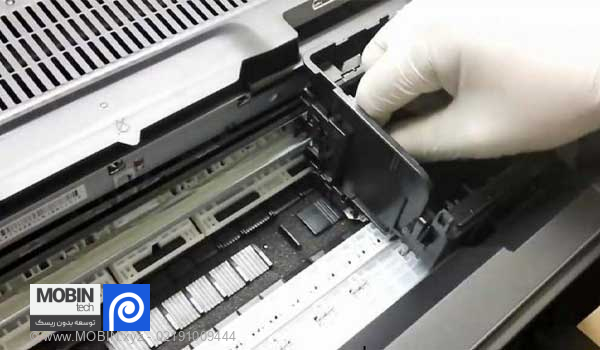
2. Automatic washing of the banner printing machine head
Devices Head washing They have the ability to pump heated solvent into the head while vibrating using several pumps. Suction from inside the head by changing the direction of the hoses. In addition, these devices have filters placed between the pump and the head. This prevents lint and clots that come out of the head from being directed back into the head. The overall washing process with the device is similar to washing by hand, with the difference that the device vibrates the head and allows the heated solvent to be pumped, and having a filter in the solvent path to trap the dirt inside the head makes the washing process more accurate and professional, and brings a more satisfactory result. Note: To clean the heads of your device with a machine, be sure to seek help from experienced and reputable companies in this field.
Washing head zar 128
It should be noted that only the ZAR 128 heads can be immersed in solvent and completely immersed in solvent. Do not immerse any other type of head in solvent at all.
Washing head 382
Be very careful when washing ZAR 382 (ZAR Proton) heads. And when washing by hand or with a machine, do not pressurize the solvent into the head. Because the manifold on top of the 382 heads usually tears during washing. And the solvent comes out of the side of the head and can no longer stick.
Epson head cleaning
There is a general point for washing Epson heads, and that is that Epson DX5 and DX7 heads are not recommended for washing due to their very delicate structure. These heads have a very thin golden metal plate under the head. If the pressure of the washing solution and syringe increases slightly, the plate opens slightly and allows the different color channels to pass through each other. And this is where when you enter the solvent from one channel, you can see that it comes up from another channel and comes out. In this case, the two channels pass through each other from below and usually the head gets clogged during printing.
Ways to clean under the head:
- By a special head spoon
- By automatic cleaning of the device
- Using the device's manual or automatic purge
If you use the third method, be sure to use a special cloth to clean the plate. The cloth should not touch the underside of the head because it will dry out the underside of the head and may damage the head.
1 Opinion
