



Types of banner printing machine fans
If with Banner printing machine You've probably noticed that print quality doesn't just depend on the printhead and ink! One of the important factors in clean, wrinkle-free printing and quick drying of the banner is Banner printing machine fan They are.
In this article, we want to fully familiarize ourselves with the types of banner printing machine fans, their installation location, their use, and the difference between dryer fans and vacuum fans.
Related products


Special sale!



Description
📅 Content updated on: 15/02/2020
Types of banner printing machine fans
Banner printing machine A professional usually from Two main types of fans They use:
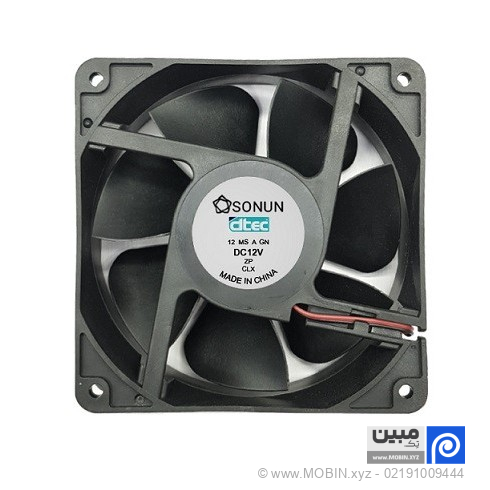
1. Dryer fans (usually 12×12 size)
✅ Installation location: In front of the device and above the banner exit point
✅ Quantity: Usually one or two rows (depending on the width of the device and model)
✅ Application:
- Fast drying of ink on the banner
- Preventing color from spreading or smudging the print
- Preparing the banner to roll up without sticking
✅ Fan type: Most industrial cooling fans are 12 x 12 cm in size. Some models come with a heating element and produce warm air.
2. Spiral fan (vacuum fan)
✅ Installation location: Under the machine, in the lower part of the tray or printing table
✅ Application:
- Air suction under the banner
- Attaching the banner roll to the flat surface of the machine
- Prevents wrinkles, waves, and lifting of the banner when the head moves.
- Improve printing accuracy and increase output quality
✅ Fan type: High suction helical fan (crystal fan or centrifugal fan). These fans are designed to pull air out from the floor, creating a partial vacuum on the print surface.
Why is the performance of the fan of a banner printing machine so important?
❌ If the dryer fans are not working properly:
- The banner sticks to the head of the device.
- The color is spreading.
- The edges of the print are smudged.
❌ If the vacuum fan is weak:
- The banner wrinkles when printed.
- The edges of the print are shifting.
- The resolution of the design decreases and the probability of the head colliding with the media increases.
✅ Result?
Increased printing failures and reduced output quality = time and financial loss for the printing house operator!
The difference between a 12×12 fan and a spiral fan in a banner printing machine
| Feature | 12×12 fan (dryer) | Spiral fan (vacuum) |
|---|---|---|
| Installation location | Front of the device | Under the device |
| Main goal | Drying the ink | Attaching the banner to the table |
| Flow type | Direct or hot current | Air suction |
| Appearance | Square with open blades | A snail with a tubular outlet |
| How it works | Blower | Vacuum Fan |
Tips for maintaining fans
- Clean the dust on the fans once a month.
- If the fan noise becomes louder than normal, check the bearings.
- Broken fans will reduce print quality, replace them quickly.
- If the print is wavy, first check the operation of the scroll fan.
Conclusion
Banner printing machine fan It's not just a simple piece! These fans (what 12×12 dryer And what? Vacuum scroll fan) plays a fundamental role in Print quality, work speed and device health They do. If you're looking for clean, professional, and flawless printing, be sure to take the condition of the fans seriously.
Additional information
| Model | 12×12, 9×9, Vacuum (spiral) |
|---|
Reviews (0)

Get price list
Related products
Special sale!
